Windows Server is the operating system behind most of our RDP and VPS plans. Over the years Aminserve has offered Windows Server 2012, 2016, 2019, 2022 and — most recently — 2025 (Windows Server 2022 and 2025 use the same modern security baseline). Choosing the right version matters for software compatibility, security and performance. This guide explains each option and how to pick.
Which Windows Server versions are available?
Aminserve offers the full family of Windows Server operating systems on RDP, VPS and dedicated-server plans, including:
- Windows Server 2012
- Windows Server 2016
- Windows Server 2019
- Windows Server 2022
- Windows Server 2025 (latest)
You pick the version during checkout, and you always get full administrator access with whatever you choose.
The older versions: Windows Server 2012 and 2016
Windows Server 2012 and 2016 are the veteran options. They are lighter on resources and newer is not always better if your software was built for an older system:
- Windows Server 2012 — a fast, familiar and stable server OS. It is a sensible choice when you run legacy business software that expects this exact generation of Windows.
- Windows Server 2016 — adds newer security modules and improved compatibility over 2012, while keeping a low resource footprint. It was designed for reliability across a wide range of server workloads.
If a particular application you depend on only runs reliably on 2012 or 2016, choose that version over the newest one — stability beats novelty.
The newer versions: 2019, 2022 and 2025
- Windows Server 2019 — a strong middle ground with up-to-date security and good performance on modest plans.
- Windows Server 2022 — modern security, official support for current hardware, and a solid choice for most new deployments.
- Windows Server 2025 — the newest edition, with the latest security model and features. Pick it when you want the most current platform and have the RAM to run it comfortably.
What plan do I need for Windows Server?
Newer Windows Server versions need more power. In our experience, follow this rough guide:
- 2 GB RAM — minimum for the older versions (2012, 2016); fine for light use.
- 4 GB RAM — the recommended baseline for 2019 and above, and for running real applications.
- 8 GB RAM — for multiple applications, databases, or heavier workloads.
Choosing a plan with enough RAM is the single biggest factor in whether your Windows server feels responsive or sluggish.
How to switch or upgrade the Windows version
You can change the operating system on your existing RDP or VPS at any time:
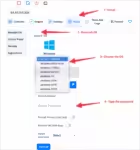
- Log in to your client area.
- Open your service and go to the Install or Reinstall OS tab.
- Select the Windows Server version you want.
- Set a new password, confirm, and wait about 15 minutes.
Important: reinstalling wipes the disk. Back up any files you need first — see our fixing and managing guide for the full steps and the data warning.
Windows Server vs Windows 10/11 for RDP
Windows Server and the desktop versions (Windows 10/11) both run Windows, but they are built for different jobs:
- Windows Server — designed for servers: hosting, networking, security, multiple users, no consumer interface. The right choice for business and multi-user use.
- Windows 10/11 — the familiar desktop system you see on a PC. Good for a personal RDP where you want a normal Windows desktop and single-user access. See our Windows 10 RDP guide.
If you are not sure, ask: will more than one person log in, and is it used for hosting/services? Then Windows Server. Just you, want a normal desktop? Then Windows 10/11.
Which Windows Server should I choose?
Quick answer:
- Legacy software → Windows Server 2012 or 2016.
- Everyday modern workloads → Windows Server 2019 or 2022.
- Newest features and security → Windows Server 2025.
- Not sure → Windows Server 2022 is a safe default.
All are available instantly on Aminserve RDP and VPS plans with administrator access, backups and 24/7 support to help you settle in.