If you recently tried to open a saved connection to your server and saw a messy, “broken” pop-up window, you are not alone. A new Remote Desktop security warning is causing confusion for Windows 11 users because the text and buttons are overlapping or hidden.
This issue makes it difficult to read the safety message or even find the Connect button to start your session. You will learn why this is happening, which updates are responsible, and how to safely navigate the glitch until a permanent fix arrives.
The “Broken” UI: Windows 11 RDP Bug April 2026
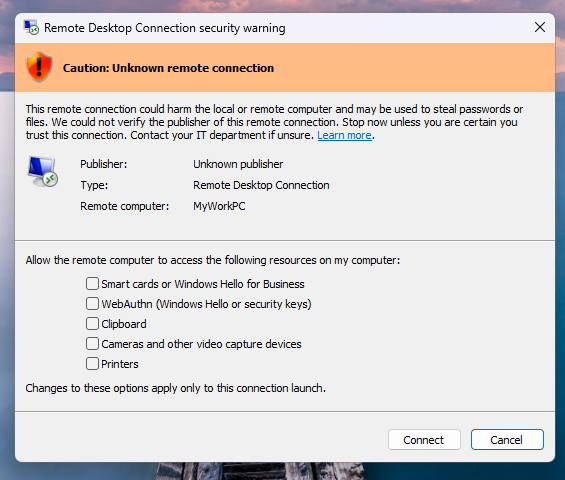
Microsoft has officially confirmed that the security dialogs for Remote Desktop Protocol (RDP) are rendering incorrectly. On many systems, the warning box appears with overlapping text that looks like a software error rather than a security feature.
This Windows 11 RDP bug April 2026 is particularly noticeable on setups using multiple monitors with different Display Scaling settings. If your laptop is set to 150% and your monitor to 100%, the warning window may hide the very buttons you need to click.
Practitioner Note: While the window looks “hacked” or broken, the underlying security check is still working perfectly; only the visual interface is glitched.
Why did Microsoft add this warning?
This new Remote Desktop security warning was actually created to protect you from cybercriminals. Hackers often send malicious .rdp files in phishing emails to trick users into connecting to a dangerous server.
Following reports of a spoofing vulnerability from security agencies, Microsoft introduced this mandatory warning to ensure you verify every connection. It is designed to stop your computer from sharing local drives or printers with an untrusted remote machine by default.
Identifying the KB5083769 Issue
The problem started appearing immediately after the April 14, 2026, Patch Tuesday rollout. Most reports link the rendering glitch to the KB5083769 issue on Windows 11 version 24H2 and 25H2.
If you are using a newer preview build of Windows, you might also see this behavior tied to KB5083768. You can verify if these updates are installed on your system by using a quick command.
# Search for the specific April 2026 updates on your system
Get-HotFix -Id KB5083769, KB5083768, KB5082200
How to navigate the glitched warning
Until Microsoft releases a “hotfix” to repair the visual layout, you may need to use these workarounds to access your Remote Desktop (RDP) services. If you cannot see the Connect or Cancel buttons, try the following steps:
- Adjust your scaling: Temporarily set your Display Scaling to 100% in the Windows Settings menu.
- Use the keyboard: Often, pressing the Tab key will move the “focus” to the hidden buttons, and Enter will trigger the connection.
- Trust the file: If you are connecting to a known, safe server, check the box that says “Don’t ask me again for connections to this computer” to bypass the bug in the future.
Practitioner Note: Only check the “Don’t ask me again” box if you are 100% certain the RDP file came from a trusted source like your own IT department.
Why you should keep automatic updates enabled
It is tempting to disable Windows updates when a bug like this occurs, but that is a major security risk. While this Remote Desktop security warning is visually annoying, the update also fixed critical Remote Code Execution (RCE) vulnerabilities.
We always recommend keeping Windows Automatic Updates enabled to ensure your system stays protected against the latest threats. Microsoft typically resolves UI bugs like this within a few weeks, and the Windows Release Health dashboard will post a notification as soon as the fix is ready.
Staying updated is the best way to protect your Windows VPS hosting and local data from modern exploits. If you are an AminServe customer and cannot reach your server due to this UI glitch, our support team can help you verify your connection settings.
| Windows Version | KB Update ID | Issue Status |
|---|---|---|
| Windows 11 24H2 / 25H2 | KB5083769 | Confirmed Bug |
| Windows 11 26H1 | KB5083768 | Confirmed Bug |
| Windows 10 (All) | KB5082200 | Investigating |
Table summarizing the Windows versions affected by the Remote Desktop security warning rendering bug.