While IPv6 adoption continues across global networks, many administrators managing a Linux VPS choose to disable IPv6 entirely. If your hosting provider or internal infrastructure routes traffic strictly over IPv4, keeping an unconfigured IPv6 stack active can introduce DNS resolution delays, trigger unexpected connection timeouts when package managers attempt IPv6 routes first, or expose unmonitored attack vectors if your firewall only filters IPv4.
Historically, administrators disabled IPv6 using outdated modprobe blacklist rules on legacy CentOS releases. On modern Linux distributions running Ubuntu 24.04/22.04 LTS, Debian 12, AlmaLinux 9, and Rocky Linux, IPv6 is compiled directly into the kernel or managed dynamically by network daemons. This runbook covers how to cleanly disable IPv6 using kernel parameters, Netplan, and NetworkManager.
1. Disable IPv6 System-Wide with sysctl (All Distributions)
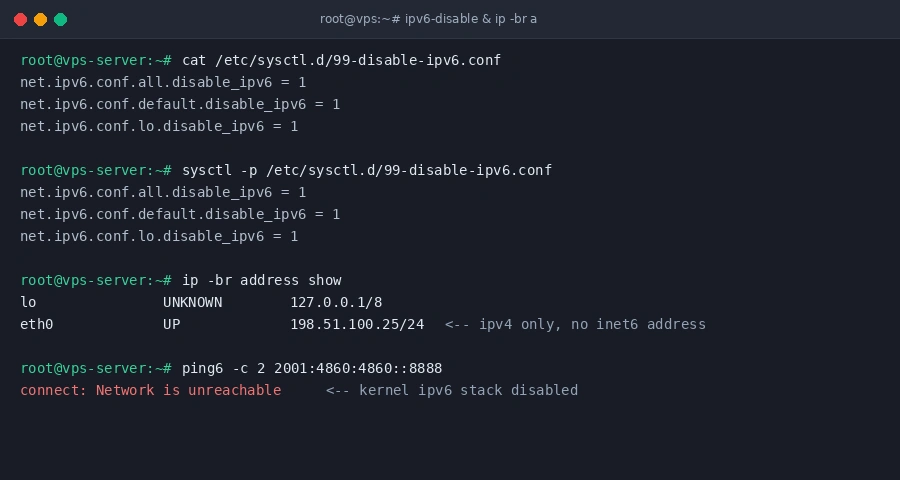
The cleanest and most reliable method across all modern Linux distributions is instructing the Linux kernel to shut down IPv6 processing on all network interfaces. Create a dedicated configuration file in the sysctl.d directory:
cat << 'EOF' | sudo tee /etc/sysctl.d/99-disable-ipv6.conf
net.ipv6.conf.all.disable_ipv6 = 1
net.ipv6.conf.default.disable_ipv6 = 1
net.ipv6.conf.lo.disable_ipv6 = 1
EOF
Apply the new settings immediately without restarting your server:
sudo sysctl -p /etc/sysctl.d/99-disable-ipv6.confThis disables IPv6 on all current network adapters, newly generated virtual interfaces, and the local loopback adapter.
2. Disable IPv6 via Netplan (Ubuntu Server)
If your server runs Ubuntu and you prefer managing network settings through Netplan, locate your primary interface YAML configuration in /etc/netplan/ (for example, 01-netcfg.yaml or 50-cloud-init.yaml):
sudo nano /etc/netplan/50-cloud-init.yamlUnder your primary ethernet interface (such as eth0 or ens3), explicitly disable IPv6 autoconfiguration and link-local addressing:
network:
  version: 2
  ethernets:
    eth0:
      dhcp4: true
      dhcp6: false
      accept-ra: false
      link-local: [ ]
Save your changes and apply the network definition:
sudo netplan apply3. Disable IPv6 via NetworkManager (AlmaLinux, Rocky Linux, RHEL)
Enterprise Linux distributions use NetworkManager as their core networking engine. You can disable IPv6 on your active network profile using nmcli without editing configuration files manually.
First, identify your active connection profile name:
nmcli connection showAssuming your connection is named System eth0, modify the IPv6 method to disabled:
sudo nmcli connection modify "System eth0" ipv6.method "disabled"
sudo nmcli connection up "System eth0"
4. Prevent Application Breakage (SSH and Mail Daemons)
When you disable IPv6 at the kernel level, services configured to listen exclusively on IPv6 sockets may fail to start. Update your core daemons to bind strictly to IPv4.
For OpenSSH server, edit /etc/ssh/sshd_config:
# Change AddressFamily from any to inet (IPv4 only):
AddressFamily inet
Restart sshd to apply the configuration:
sudo systemctl restart sshdIf you run Postfix for mail routing, edit /etc/postfix/main.cf and restrict protocols to IPv4:
inet_protocols = ipv45. Verify IPv6 Is Completely Inactive
Confirm that your network interfaces no longer carry inet6 addresses by executing:
ip -br address showThe output should show only IPv4 addresses without any inet6 entries. Next, test an outbound IPv6 ping:
ping6 -c 2 2001:4860:4860::8888If the kernel reports connect: Network is unreachable, your IPv6 network stack is completely neutralized.
For workloads requiring dual-stack connectivity or clean IPv4 and IPv6 subnets, Aminserve provides high-speed KVM VPS and dedicated servers with unmetered bandwidth and full reverse DNS control.