Two commands tell you everything you need to know about your CPU on Linux: lscpu for a clean summary, and /proc/cpuinfo when you need raw data inside a script.
The Quick Summary: lscpu
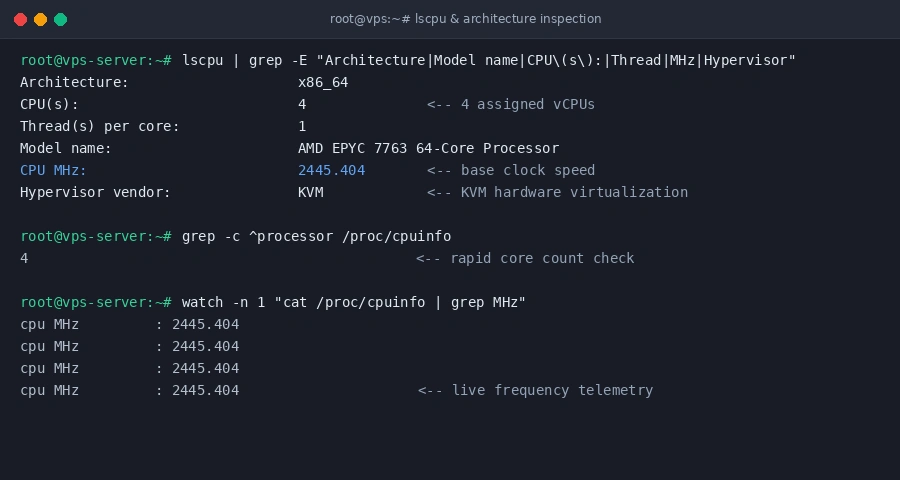
Run lscpu and scan for these five lines:
lscpu | grep -E 'Model name|CPU\(s\):|Thread|MHz|Hypervisor'What each line tells you:
- Model name: The actual processor silicon (e.g. AMD EPYC 7763 or Intel Xeon Gold).
- CPU(s): How many vCPU cores your VPS plan has.
- Thread(s) per core: If 1, each vCPU gets an independent physical hardware thread.
- CPU MHz: The current clock frequency.
- Hypervisor vendor: Usually KVM on hardware-virtualized instances.
Count Cores in One Second
If you only want a number for a shell script without any parsing hassle:
grep -c ^processor /proc/cpuinfoReturns 2, 4, 8, or whatever number of cores are allocated to your environment.
Watch for Throttling Under Load
Spec sheets show base clocks, but clock speeds shift under heavy compilation or database indexing. Watch your active megahertz live every second:
watch -n 1 "cat /proc/cpuinfo | grep 'MHz'"If numbers tank while your server load is high, the host hypervisor is likely under heavy contention or aggressive power saving.
Confirm Hardware Encryption (AES-NI)
Running SSL-heavy web apps, WireGuard, or OpenVPN? Verify whether your CPU supports silicon-level AES acceleration:
grep -m1 -o 'aes' /proc/cpuinfoIf the terminal prints aes, hardware cryptography is active and TLS handshakes will not bog down your cores.