How to List Open and Listening Ports on Linux

Premium services since 2010

Trusted by thousands of businesses worldwide • 99.9% Uptime Guarantee • Crypto Accepted

Table of Contents

Setting up a new server or taking over an existing VPS? One of your first moves should always be checking which ports are listening for incoming traffic.

Every listening port is an open door. An unmonitored database bound to the wrong IP address can let anyone on the internet query your data without authentication. Here is how to audit your open ports in seconds using modern Linux tools.

The Go-To Command: ss -tulpn

On modern Ubuntu, Debian, or AlmaLinux, run socket statistics with these exact flags:

sudo ss -tulpn

Here is what the flags mean in plain English:

  • -t: Show TCP ports (web, SSH, databases).
  • -u: Show UDP ports (DNS, NTP, WireGuard).
  • -l: Show listening ports only (ignoring active browsing sessions).
  • -p: Print the exact process name and PID owning the port.
  • -n: Show numbers directly instead of waiting for slow reverse-DNS lookups.
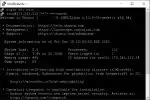
Linux ss command listing listening ports and process names in terminal

The Critical Check: 127.0.0.1 vs 0.0.0.0

Look closely at the Local Address:Port column in your terminal:

  • 127.0.0.1:port: Safe. The service is listening only on the local machine. Nobody on the internet can touch it. MySQL, MariaDB, and Redis should almost always look like this.
  • 0.0.0.0:port or [::]:port: Public. The service is open to the entire internet. Only your web server (80/443) and SSH (22) should generally have this binding.

If you see Redis (6379) or MySQL (3306) listening on 0.0.0.0, fix your service configuration immediately and set bind-address = 127.0.0.1 before a scanner finds it.

Check a Single Port Fast with lsof

Trying to launch a Docker container or development server and getting an “Address already in use” error? Find which process is hogging the port:

sudo lsof -i :8080

This spits out the exact PID holding that port so you can stop it with sudo systemctl stop <service> or kill it cleanly.

To verify from the outside that your closed ports are actually closed, test with netcat from your local machine: nc -zv 198.51.100.25 3306. If it times out, your firewall and port bindings are doing their job.

Never Miss an Update

Get expert tips, tutorials, and hosting insights delivered to your inbox weekly. Join 10,000+ subscribers!
🔒 We respect your privacy. Unsubscribe anytime.