Standard network firewalls like UFW or CSF inspect incoming IP addresses and ports, but they cannot see inside an HTTP payload. If an attacker sends an SQL injection or cross-site scripting (XSS) payload through port 443, network firewalls wave it right through. That is where ModSecurity (open-source Web Application Firewall) steps in: it inspects HTTP/HTTPS requests in real-time before they touch your PHP or Node.js backend.
Here is how to install ModSecurity with the official OWASP Core Rule Set (CRS) on Apache or Nginx on Ubuntu, Debian, or AlmaLinux, switch from detection mode to active blocking, and test it against live attack strings.
1. Install ModSecurity and OWASP Core Rule Set
On Ubuntu / Debian (Apache):
sudo apt update
sudo apt install -y libapache2-mod-security2 modsecurity-crs
sudo cp /etc/modsecurity/modsecurity.conf-recommended /etc/modsecurity/modsecurity.conf
On AlmaLinux / Rocky Linux / RHEL:
sudo dnf install -y epel-release
sudo dnf install -y mod_security mod_security_crs
sudo cp /etc/httpd/conf.d/mod_security.conf /etc/httpd/conf.d/mod_security.conf.bak
2. The Crucial Switch: DetectionOnly vs On
By default, ModSecurity installs in passive mode (DetectionOnly). It will write warnings to your audit log, but it will not block any malicious requests until you change this directive.
Open the main configuration file in your editor:
# On Ubuntu/Debian:
sudo nano /etc/modsecurity/modsecurity.conf

# On AlmaLinux/Rocky:
sudo nano /etc/httpd/conf.d/mod_security.conf
Locate the first directive and update it:
# Change this:
SecRuleEngine DetectionOnly

# To this:
SecRuleEngine On
Restart your web server to apply the changes:
# Apache:
sudo systemctl restart apache2  # Ubuntu/Debian
sudo systemctl restart httpd    # AlmaLinux/Rocky

# Nginx:
sudo systemctl restart nginx
3. Test Active Protection with a Dummy Attack
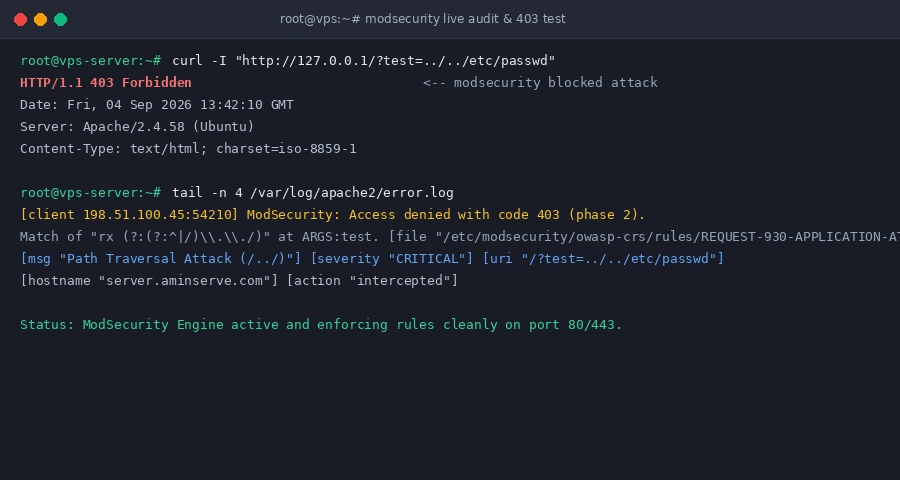
Never assume your WAF is working without triggering a rule. Send a synthetic Directory Traversal string to your website via curl:
curl -I "http://127.0.0.1/?test=../../etc/passwd"If ModSecurity is active, the web server immediately terminates the connection with an HTTP/1.1 403 Forbidden response, keeping the query completely away from your website’s database.
4. Where to Find Blocked IP Logs
When a legitimate visitor or WordPress plugin gets blocked by a false positive, check the ModSecurity audit log to identify the triggered Rule ID:
# View real-time security blocks:
tail -f /var/log/apache2/error.log     # Ubuntu/Debian
tail -f /var/log/httpd/error_log        # AlmaLinux/Rocky
If a specific rule ID conflicts with your CMS, disable only that individual rule using SecRuleRemoveById [RuleID] inside your VirtualHost configuration rather than turning off the entire firewall.